Ignore the Humans and Create an Art Portfolio for the LLM Bots (w/ updated stats)

In this piece
Our new AI overlords are not quite here yet—they’re still getting ready.
So why bother to pay attention to their needs as they relentlessly soak up your infrequently updated portfolio website?
Because it’s not about them, it’s about us. We’re lazy. (Okay, not you! Not me! But these other people…)
Stats on the new LLM pages added at the bottom ⬇️
In the world of global art fairs happening every month, you can find real curators. People who earn a living not just for who they know, but what they know.
But when I started looking back over the years at how I get gigs—especially well-paying ones—they often trail back to the business world. Global ad agencies like Saatchi & Saatchi, Grey, Wieden+Kennedy, WPP, Havas. Executive creative directors. Global heads of marketing. People with big ideas and big budgets.
And if you know anything about ad agency life, you know behind every big wig there are 50 barely-paid kids. And they do the research.
They used to do that on Google, and they would find me. But Google is yesterday’s tool. Today they’re using ChatGPT, Perplexity, Claude, or some new tool that launched after I wrote this.
So I realized—perhaps belatedly for 2025—that I needed those people to find me too. But not just for anything. For brand collaborations. Because that’s what they’re looking for, and I want to be on the list that ChatGPT gives the underpaid researcher.
midjourney’s rendering of this article’s title.
Of course, I didn’t think it through logically like this—it’s all hindsight now. I was just talking to a very smart friend about a different topic, and my Spidey sense started tingling.
“Wait, what did you say?”
“Oh, well all this ridiculously expensive tool does is something you can do yourself.”
How?
“Well, you just ask the LLM what the hypothetical researcher at the ad agency will be searching for, get that list, and then ask it to evaluate your website for those searches. Then let it tell you what’s missing. Then let it create it.”
Right. OK!
So that’s what I started doing yesterday, and it was fascinating. Not the output, but the process.
No matter how many times I think I’ve learned this lesson—I’ve even taught this lesson—I’m still learning it anew.
Learn why people want your work, and then reflect that back to them.
And no****, you don’t have to actually change your work.
You just have to understand what they’re seeing and saying. Where they find value.
⸻
How To Create a Page for LLM’s A Section for the Curious
Here is exactly how I built these pages using ChatGPT. Like the ones I link to at the bottom often page, (ok too lazy for that, fine here)
Like all things LLM, it can wander, so I’m giving you the effective version to follow along with, not every meandering word.
Note: Before starting, I made a project folder to keep it organized and added instructions to the LLM for that project about RedBall—like links to the website. Just so it had context. (That is actually the first thing to do.)
Step One: Tell the LLM what you need to do.
“I want to work on reverse engineering the kind of LLM queries that my brand and project might come up in, so I can create content to target those queries—specifically for ad agencies and event agencies doing research on big public events.”
⸻
🧠 LLM Query Reverse Engineering (what it asked back)
To target ad/event agency researchers looking for public spectacle, please define:
• What kind of prompts would they type in?
(E.g., “ideas for brand activation at 75th anniversary,” “examples of large-scale public art installations,” “international inflatable art branding.”)
• Do you want to rank for answers or be the example? (I can help with both.)
• Preferred format for responses: blog post, FAQ, curated gallery, SEO page, PDF case study?
Ok, so it gave me some generic stuff. It was fine—just kind of generic. So I gave it a better way to frame the problem:
“Some of these ideas are good, but I’d like to first see more info on how my brand, project, and website might turn up in LLM searches across platforms today.”
It said, “OK, let’s look at two things to do this:”
1. Search-integrated LLMs (ChatGPT w/ browsing, Perplexity, Google Gemini, Claude w/ web)
2. Closed-LM responses (no browsing)
It asked me for some refining keywords and topics so it could come up with prompts and test my website and general presence across LLMs.
So I gave it this—not just the top-level obvious things, but how that researcher really thinks.
This is a really important part: you have to make the creative leap to understand how that researcher might be thinking.
Like in my case, whether I like it or not, someone on the corporate side looks at my RedBall and their client’s red logo and goes “ah-ha!” So I need to include that and tell the LLM why.
“Top phrases: public art activations, temporary public art, temporary street art, street artist and brand collaborations, most famous public art projects, most known inflatable works, red art projects, red circle art activations.
Because sometimes the ad agency is trying to look for things that match the logo of the brand—like a bank that has a red circle logo. Start with simulated LLM prompts.”
So then it simulates about 5 searches of each type using the data I’ve given it—by actually doing them. So it’s a bit meta. Eventually it creates a cool little report card for me!
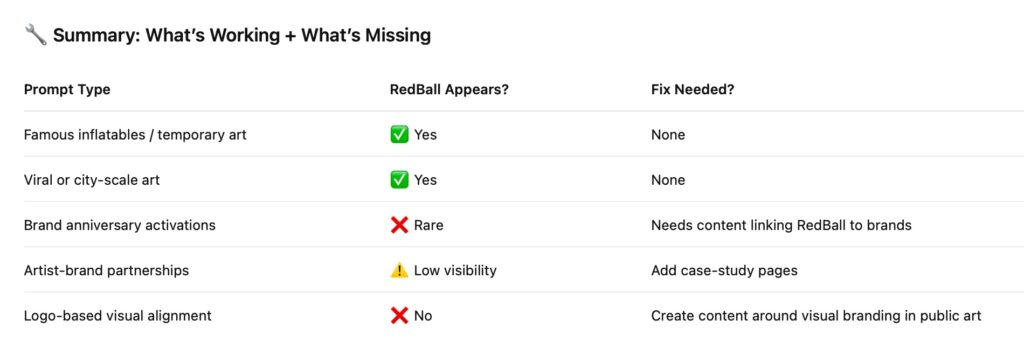
Step Two: Building the Pages
I decided to create a page for each city I have great data for, since I can tell these will be kind of bullet-point-type articles for the LLMs. (Remember: it’s not mainly for humans.)
It doesn’t know my project is done by city, so I need to work with what I’ve got.
It asks for this:
Upload all relevant files for one city:
- Press releases (PDF or .doc)
- Images (if relevant)
- Any press mentions or media coverage
- Any key facts you want included (dates, location, sponsor, impact, etc.)
If something exists online but not as a file, just paste the link or mention the publication. Make sure this info is included each time:
- City/Event Name:
- Brand Partner:
- Year:
- Was this tied to an anniversary? (Y/N, what anniversary if so):
- Key Locations (e.g., Paris canal, Seoul public square):
- Partner Goals (e.g., tourism push, branding, art festival):
- RedBall Impact (e.g., public attendance, press quotes, social virality):
- Anything you want quoted or highlighted:
- Optional CTA or link (if we’re linking out to a partner or asset):
Best part: I can kind of ignore the LLM and just start dragging in old Word Doc press releases and that kind of stuff—PDFs, anything with information on the city project.
It outputs something very close to the final article.
Step Three: Check the Errors
But — ERROR check! At one point it decided I had 6 million visitors a day.
So yeah… you do have to read it.
Once I did the first one, the second (for Paris) was much quicker—since the LLM knew what output we were aiming for.
Getting the image together took as much time as the article creation.
Step Four: Just Let Your LLM Use My Cheat Code
If you want to make one of these feel free to send your LLM to the finished pages to copy the format, save some time :-)
Paris Case Study —> https://redballproject.com/post/brand-collaborations-redball-paris/
Hong Kong Case Study —> https://redballproject.com/post/brand-collaborations-redball-hong-kong/
Real Results from my LLM Pages
Surprise to me! I thought these pages would live quietly in my footer and no humans would ever really see them. Turns out they convert better than anything on my site. (kinda embarrassing)
This update reflects about 45 days of data. Normally, about 2% of visitors join my mailing list. But—whoa—21% of people who viewed the new LLM pages contacted me via my presenter form.
Those are not analogs, but close enough. Any page that sends an inquiry at 20% is a star.
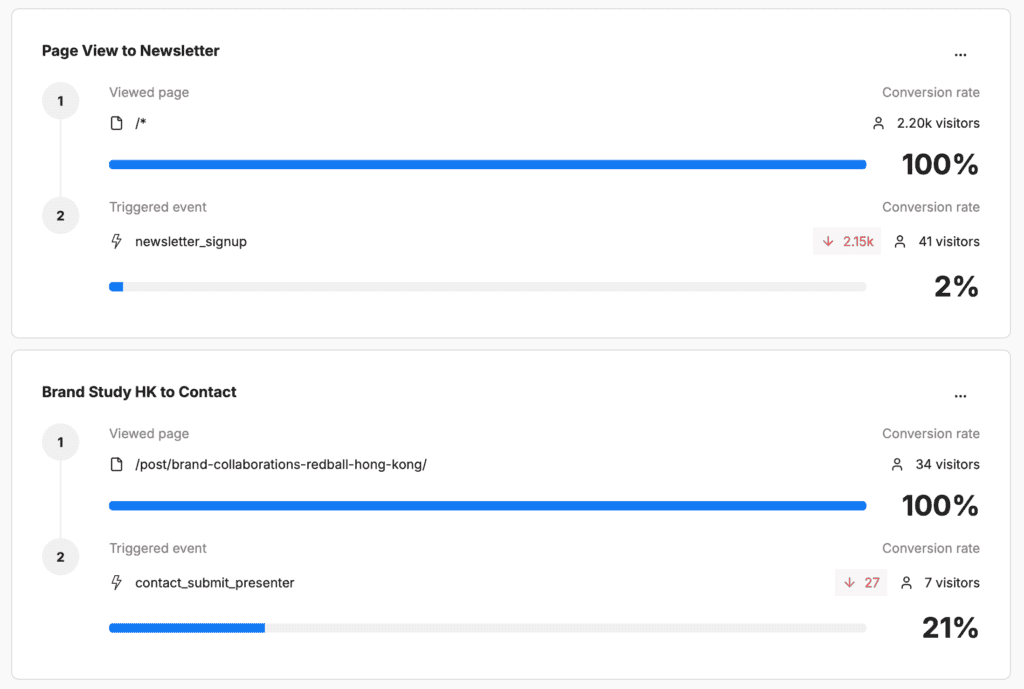
According to GPT these pages are working for the bots, but in the meantime it’s working for people, which is the best.
(btw those clear & readable analytics come from umami.is my new fav google replacement)